The short answer
Your Google Ads cost per month is the ad spend you choose, plus GST and any management fee, and you can set it from your own numbers in seven steps. Work out what an enquiry is worth to you, check what clicks cost in Keyword Planner, and turn the two into a cost per enquiry and a monthly figure. Divide that by 30.4 to get the average daily budget Google asks for: a campaign can spend up to twice it on a busy day, but no more than 30.4 times it in a month. Then choose when and where your ads run, track every enquiry, and check the account daily for the first few weeks. You’ll need a Google Ads account in your own name, your average sale value, and a way to count calls and forms. Below, we walk through each step, with what we check every day on the accounts we manage.
Most guides to Google Ads cost per month quote a range of budgets. We don’t, because a budget that suits a florist in Toowoomba tells an emergency plumber in Brisbane nothing. What works for any business is the method: start from what an enquiry is worth, let Google’s own rules turn that into a daily budget, and let real enquiries tell you when to change it. Here are the seven steps, and the problems we’ve fixed on the Google Ads accounts we run.
This guide is general information, not financial or tax advice. Google’s budget and billing rules were checked on 17 November 2026 and can change, so check Google Ads Help, and ask your accountant about GST.
What you’ll need
Four things, and about an hour:
- A Google Ads account in your business’s name. The account, its history and the billing should stay yours, whoever manages it.
- Your average profit per sale, and roughly how many enquiries turn into sales.
- A way to count enquiries: conversion tracking for forms and bookings, and a way to count phone calls.
- Keyword Planner, which is free inside a Google Ads account.
Step 1: Work out what an enquiry is worth
Start with the most you can pay for one enquiry and still make money, because that number caps your Google Ads cost per month. Multiply your average profit per sale by the share of enquiries that become sales. If a job leaves $300 profit and one in three enquiries books it, each enquiry is worth $100 to you. These numbers are made up to show the maths; use your own.
That $100 is your ceiling. Pay less than it for an enquiry and the ads make money; pay more and every enquiry loses some. It’s also the number to give anyone who manages your ads, because it turns “is Google Ads working?” into a question with a clear answer.
Step 2: Find out what clicks cost for your searches
Keyword Planner shows how often people search for your keywords and what advertisers pay to show up for them. Look up the searches you’d actually pay for, in the area you actually serve, and note a low and a high estimate for each. National averages from blog posts won’t help here: Google says the cost of each click depends on how much competing advertisers in your area are spending, how relevant your ad is to the search, and how likely that search is to lead to a sale.
That last point explains most price gaps, and it’s the biggest unknown in your Google Ads cost per month. Someone searching “emergency plumber Brisbane” is about to spend money, so advertisers pay more to reach them than to reach someone reading about pipes. Expect your most valuable searches to be your most expensive ones too.
Step 3: Turn it into your Google Ads cost per month
Two numbers turn a click price into a cost per enquiry: what a click costs, and how many clicks it takes before someone gets in touch.
- Cost per enquiry = cost per click × clicks per enquiry.
- Monthly ad spend = enquiries you want each month × cost per enquiry.
Carry on with the made-up numbers: if clicks cost $4 and one visitor in 20 gets in touch, each enquiry costs $80, which is under the $100 it’s worth. Twenty enquiries a month would need $1,600 of ad spend. That’s your Google Ads cost per month before GST and any management fee.
If the cost per enquiry comes out above what an enquiry is worth, a smaller budget won’t fix it. Improve the page people land on so more of them get in touch, or pick tighter searches so fewer clicks are wasted. Both lower the cost of each enquiry, which cutting the budget never does.
Step 4: Set the daily budget the way Google counts it
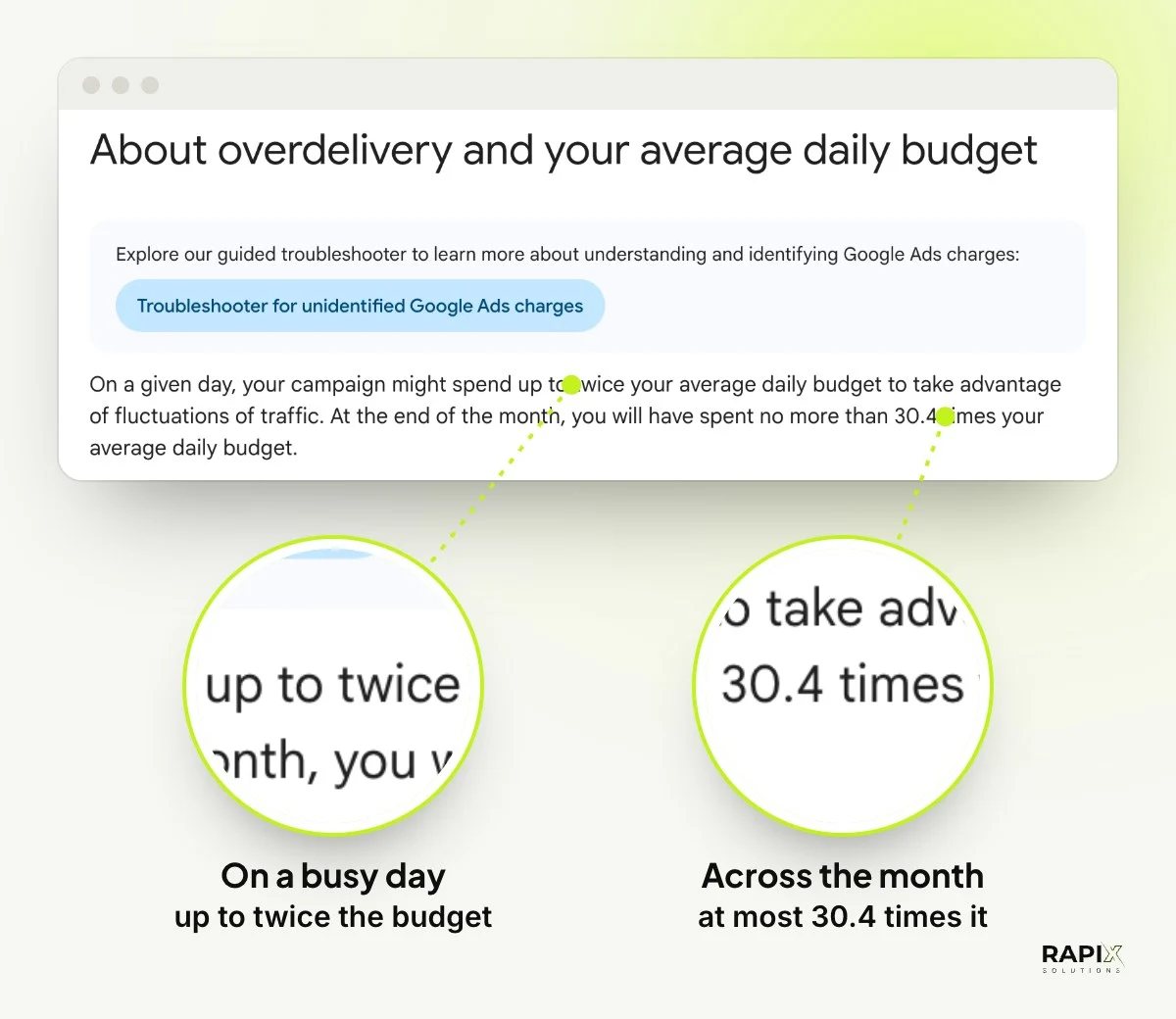
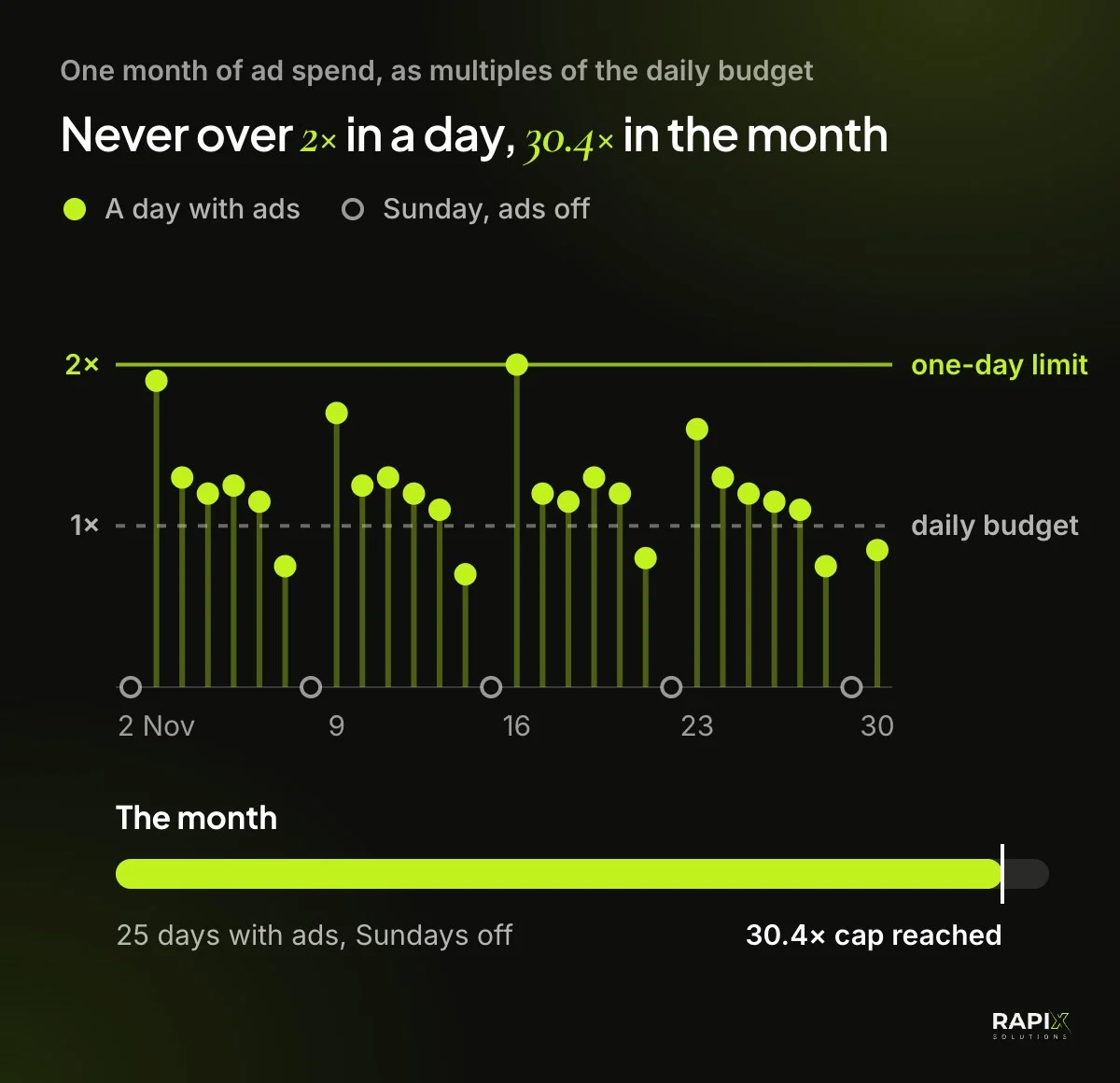
Google doesn’t ask for a monthly budget for most campaigns. You set an average daily budget, and Google’s rule on overdelivery decides the bill: on a given day a campaign might spend up to twice its average daily budget, and by the end of the month it will have spent no more than 30.4 times it. So divide your Google Ads cost per month by 30.4. In our example, $1,600 a month is a daily budget of about $53, and you can change it at any time.
One detail catches people out. If your ads run only on some days, Google still paces the month towards 30.4 times your daily budget, however many days the ads are on. Google’s own help on ad scheduling says so. With Sundays off, the other days simply spend a little more each.
Then add GST. Google says all Google Ads sales in Australia carry 10% GST for accounts with an Australian business address, so a $1,600 Google Ads cost per month becomes $1,760 on the invoice. Ask your accountant whether you can claim it back.
Step 5: Choose when and where your ads run
Show your ads only when someone can answer and only where you can do the work. Every click outside those hours or that area adds to your Google Ads cost per month without adding an enquiry you can take.
- Days and hours. An ad schedule sets when your ads show, and can raise or lower bids for each day and hour. On one account we run, for a vehicle inspection business around Brisbane, Search runs from 7 am to 9 pm Brisbane time, Monday to Saturday, with lower bids on Saturdays. The business is closed on Sundays, so its ads are off too.
- Area. Target the suburbs or the radius you serve, and leave out places you’d turn down.
- Devices. If most of your enquiries come from phones, you can lower bids on computers rather than pay the same for clicks that rarely book.
Step 6: Track every enquiry before you spend
Set up conversion tracking before the ads start, so Google counts every form, booking and call that came from an ad. Without it you can see your Google Ads cost per month but not what it brought in, and automated bidding has nothing to learn from.
- Forms and bookings: count a conversion when someone finishes, not when they open the form.
- Calls: add your number as a call asset, the call button Google shows with your ads, and count the calls it brings. Don’t type the number into the ad text: Google’s help on call assets says that can get the ad disapproved.
- Sales: if you sell online, count purchases and their value, so you can see what each dollar of ads returns.
In our Google Ads management, conversion tracking is part of the setup, together with keyword research and landing pages.
Step 7: Check daily for the first weeks, then change slowly
For the first few weeks, look at the account every day. On the accounts we manage, a short daily check covers five things, and a longer review each week covers the rest:
- Changes: what changed since the last check, and who changed it, in the change history.
- Settings: the budgets and the ad schedule are still what you set.
- Approvals: every ad, keyword and call button is approved and showing.
- Searches: the real searches your ads appeared for, with any junk added as negative keywords.
- Enquiries: what came in, from where, against what you spent.
Then change slowly. After a big change, Google’s Smart Bidding can show a “Learning” status for up to 7 days, and Google advises against changing targets several times within one conversion cycle. After we restructure an account, we leave bids and budgets alone for about two weeks, so the results we judge come from the new setup, not from the change itself. That patience keeps your Google Ads cost per month from swinging with every tweak.
When something goes wrong
These are problems we’ve found and fixed on the accounts we run. Each one raised the Google Ads cost per month, or cost enquiries, for as long as nobody noticed.
Google spent more than my daily budget
That’s allowed. A campaign can spend up to twice its average daily budget on a busy day, and we see it happen on the accounts we run. Judge the month instead: it won’t go past 30.4 times the daily budget.
Junk searches are eating the budget
Open the search terms report. It lists the real searches that showed your ads, and some will have nothing to do with your business. A vehicle inspection business we manage kept showing up for searches about roadworthy and safety certificates, which it doesn’t issue. Each one became a negative keyword, so the ads stopped showing for them. We read the list by eye, because filters miss some.
No call button, but the campaign says “Eligible”
Check the call asset itself. In one account we run, Google disapproved the call button while the campaign still showed “Eligible”, so nothing looked wrong at a glance. We resubmitted it and it was approved two days later. Since then, call buttons are part of every daily check.
Online bookings fell, but calls went up
Check the booking form and your availability before blaming the ads. On one account, online bookings dipped on a Friday while phone bookings rose. The form worked: buyers wanted Saturday times, and they rang to ask about them.
Results fell after someone changed the account
Open the change history. Google lists every change made in the past two years and, when people have their own logins, who made it. On one account, the whole ad schedule was deleted late one afternoon, and the ads ran around the clock until we restored it that night. If more than one person can edit your account, agree who changes what.
Tips that keep your Google Ads cost per month under control
- Keep the account and the billing in your name. With us, Google bills you directly and we charge only for managing the account, so you always see exactly what Google charged.
- Compare quotes like for like. Ad spend goes to Google; management goes to whoever runs the account. A single bundled fee hides how much reached the ads.
- Send each ad to a page about that service. A page that matches the search turns more clicks into enquiries, and the ad and the page should make the same promise. If you need new pages, our website cost guide shows what moves the price of a build.
- For an online store, get the product data right. Shopping ads are built from your product feed, so titles, prices and photos need to be accurate, and that’s easiest when the online store is built. See the store we built for UR Perfumes.
- Check a keyword’s history before you delete it. Look at its enquiries over the last few months, not just this week. The dearest keyword is sometimes the one that books the most.
- Run SEO alongside. Ads stop the day the budget does, while SEO keeps working. See what SEO costs per month and how long it takes.
Your budget in one sentence
Your Google Ads cost per month should be what an enquiry is worth to you, turned into a daily budget Google can’t run past, then adjusted by the enquiries that actually arrive. If you’d like a second pair of eyes on your account, or help setting one up, see our Google Ads service or tell us about your business. We reply the same business day, Brisbane time.